
Download TextDoc Compare Utility – compare documents, document comparison tool, text comparison, compare text, text editor, compare two files
Overview
TextDoc Compare Utility is a specialized mobile application designed to assist users in identifying differences between two text documents with precision. The app serves as a dedicated tool for editing, proofreading, and version control tasks, particularly valuable for professionals and individuals managing multiple drafts of written content. By highlighting variations in real time, it streamlines the review process and reduces the risk of oversight during revisions. The target users include writers, editors, students, and administrative staff who frequently work with textual documents across different versions.
The application supports multiple formats, including plain text (.txt) and Microsoft Word files (.doc) from Office 2003 and later, enabling users to compare documents without requiring file conversion. This versatility enhances its utility in both personal and professional environments, where users may need to verify changes in reports, contracts, or academic papers. The app’s focus on clarity and functionality positions it as a niche but effective utility within the productivity category.
Although the developer, TextDoc, did not provide additional background information, the app’s consistent design and targeted features suggest a focused development approach. Its release date of October 17, 2014, indicates a long-standing presence in the mobile productivity space, offering users a stable and tested solution for document comparison. Despite its age, the app remains relevant due to its core functionality and lightweight design.
Key Features & Functionality
TextDoc Compare Utility offers a set of well-defined features tailored to the core task of document comparison. Each feature is designed to enhance accuracy and efficiency during content review.
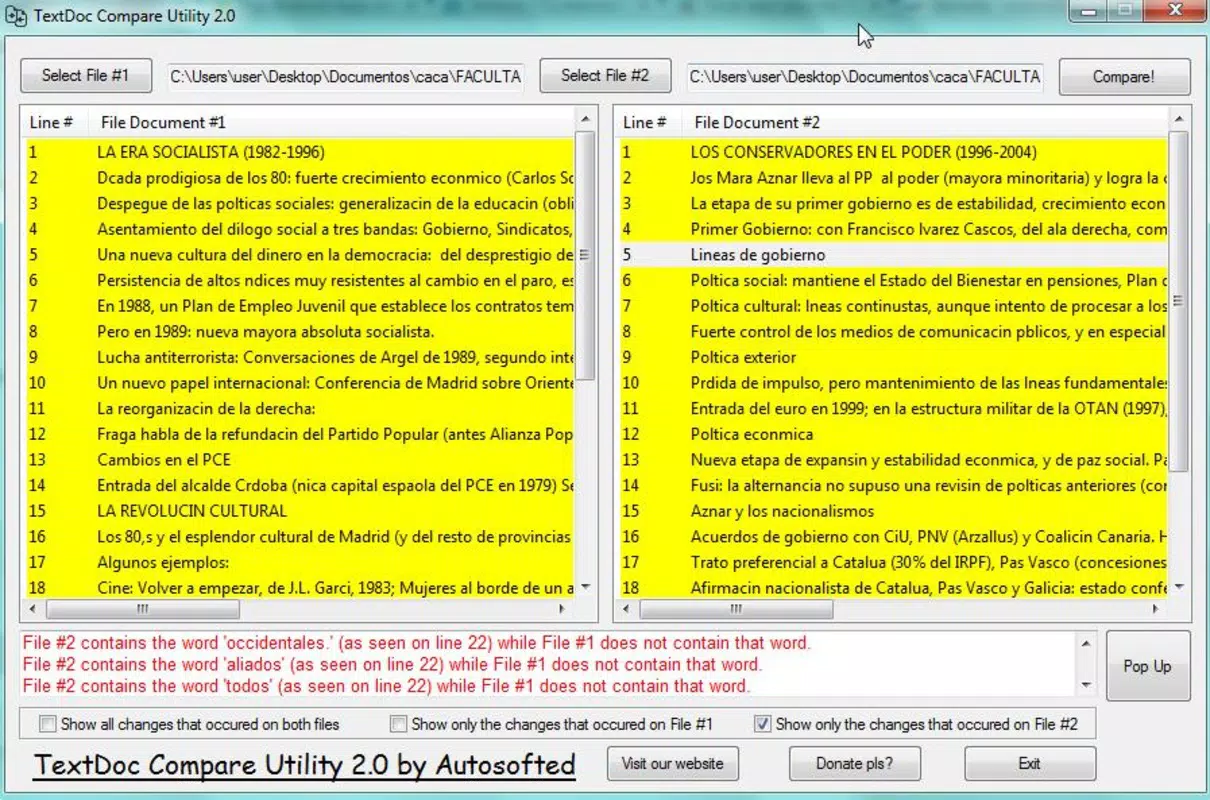
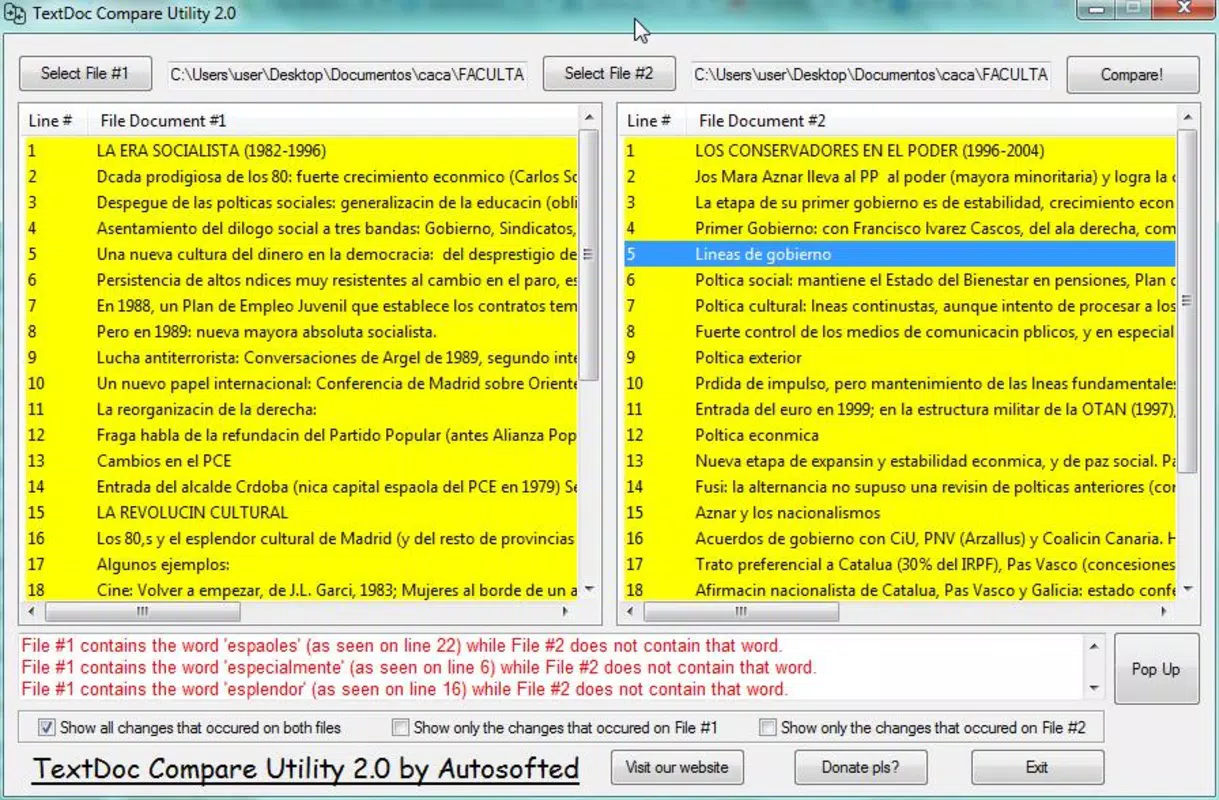
- Intuitive Interface: The app features two wide, side-by-side panels that display the documents being compared. This layout enables users to visually track changes and maintain context across both versions. The clean, minimal design ensures that even first-time users can navigate the app without confusion.
- Multi-Format Support: The application supports .txt and .doc file formats, allowing users to compare documents created in different environments. This compatibility eliminates the need for third-party converters, preserving file integrity and reducing workflow delays.
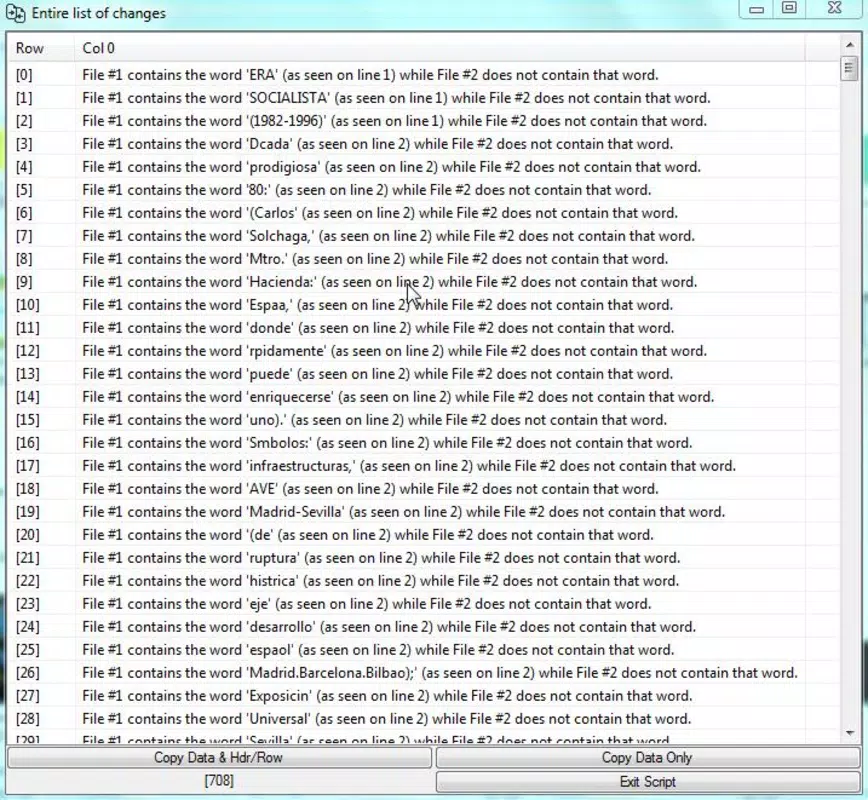
- Detailed Difference Analysis: The app highlights all textual variations, including inserted, deleted, or modified content. Users can access a structured list of changes, which helps in verifying revisions and maintaining document consistency.
- Word Frequency Tracking: This unique feature identifies how often specific words appear in each document. It assists in detecting overuse of certain terms and supports stylistic or editorial consistency checks.
- Flexible Comparison Options: Below the document panels, users can select from three comparison modes: full difference display, and two separate analysis modes. This allows for customized review workflows based on user needs.
For example, a student comparing a draft and final version of an essay can use the difference analysis to verify edits. Similarly, a legal professional reviewing contract revisions can rely on the word frequency tool to ensure terminology consistency.
Interface, UX & Performance
The user interface of TextDoc Compare Utility is designed with clarity and functionality in mind. The layout centers around two primary panels, each dedicated to one of the documents being compared. This side-by-side arrangement supports visual comparison and reduces cognitive load during analysis. Navigation is straightforward, relying on standard touch gestures such as scrolling and tapping, which are familiar to most mobile users.
The visual style is minimalistic, focusing on text readability rather than decorative elements. This approach ensures that the content remains the central focus, which is essential for detailed proofreading tasks. The app’s responsiveness appears to be consistent across various screen sizes, though specific performance metrics were not provided by the developer.
Although the developer did not list formal performance metrics, the app’s file size of 1.8MB suggests a lightweight footprint, which likely contributes to efficient loading times and low memory usage. The application does not appear to require excessive processing power, making it suitable for a broad range of Android devices, including older models.
Stability is implied by the app’s long-standing release history, though no crash reports or user feedback were included in the provided data. Users can expect a smooth experience when performing basic comparison tasks, particularly for documents of moderate length.
Platform Compatibility & Technical Requirements
TextDoc Compare Utility is available on the Android platform. The app’s current version is 1.2.1, with a file size of 1.8MB, indicating a compact and efficient design. This small footprint makes it accessible even on devices with limited storage capacity.
While the app’s compatibility with specific Android OS versions was not disclosed, its release date of October 17, 2014, suggests it may support older Android versions. However, the developer did not specify minimum OS requirements, so users should exercise caution when installing on devices running outdated system software.
Compatibility with different device categories, such as smartphones and tablets, was not fully disclosed. Nonetheless, the app’s interface appears to adapt to various screen sizes, supporting a range of mobile form factors. Users are advised to verify device compatibility before installation.
Pros and Cons
Pros
- Lightweight design with a small file size of 1.8MB
- Supports common document formats (.txt, .doc)
- Intuitive side-by-side comparison interface
- Offers detailed difference analysis for accurate proofreading
- Includes word frequency tracking for stylistic consistency
- Free to download and use
Cons
- Unsupported file formats beyond .txt and .doc
- Developer did not specify minimum OS requirements
- Compatibility with modern Android versions not confirmed
- Limited to text-based comparison; no support for rich text or PDFs
- No information on update frequency or future development plans
FAQ
Is TextDoc Compare Utility safe to download?
The app is free and available through official Android distribution channels. No security risks were reported in the provided data. Users should ensure downloads come from trusted sources to maintain device safety.
Can I compare PDF files using this app?
Based on the provided information, the app does not support PDF files. It only works with .txt and .doc formats.
Does the app require an internet connection?
There is no indication that the app requires an internet connection. It operates offline, which enhances privacy and usability in low-connectivity environments.
How often is the app updated?
The developer did not disclose update frequency or release schedule. The last known version was released in 2014, which may suggest limited ongoing maintenance.
Is TextDoc Compare Utility available for iOS?
The app is currently available only for Android. No information about iOS availability was provided.
Final Thoughts
TextDoc Compare Utility remains a practical solution for users who need a reliable, no-frills tool to compare text documents on mobile devices. Its lightweight nature, combined with essential features like side-by-side viewing, difference highlighting, and word frequency tracking, makes it a valuable asset for writers, editors, and students managing multiple document versions.
While the app lacks modern enhancements such as cloud integration or support for newer file types, its core functionality is solid and well-executed. The absence of in-app purchases and its free availability further strengthen its appeal. For users seeking a simple, efficient way to compare two files without complexity, this app delivers consistent value.
Despite its age, the app continues to serve a specific niche with minimal overhead. If you're looking for a secure, fast, and straightforward way to compare documents on Android, TextDoc Compare Utility is a dependable choice.
Download TextDoc Compare Utility now


